Reviews Tool
Telus Digital • 2025
THE CHALLENGE
The existing tool contained complex workflows, fragmented information architecture, and usability issues that slowed down quality controllers during daily review tasks.
Quality controllers needed to:
- Analyze large amounts of task data
- Review automated quality flags
- Add assessments, comments, and notes
- Navigate multiple workflows efficiently
However, the current experience created friction due to:
- Difficult navigation
- Overloaded interfaces
- Unclear task hierarchy
- Limited workflow efficiency
- Poor accessibility of key actions
The goal was to redesign the experience to improve usability while supporting the operational needs of the quality control process.
MY ROLE
As Product Designer, I:
- Conducted user interviews and workflow analysis
- Identified key usability pain points
- Created wireframes and interaction flows
- Designed high-fidelity prototypes
- Collaborated with product managers and developers
- Validated solutions through user testing
UNDERSTANDING THE WORKFLOW
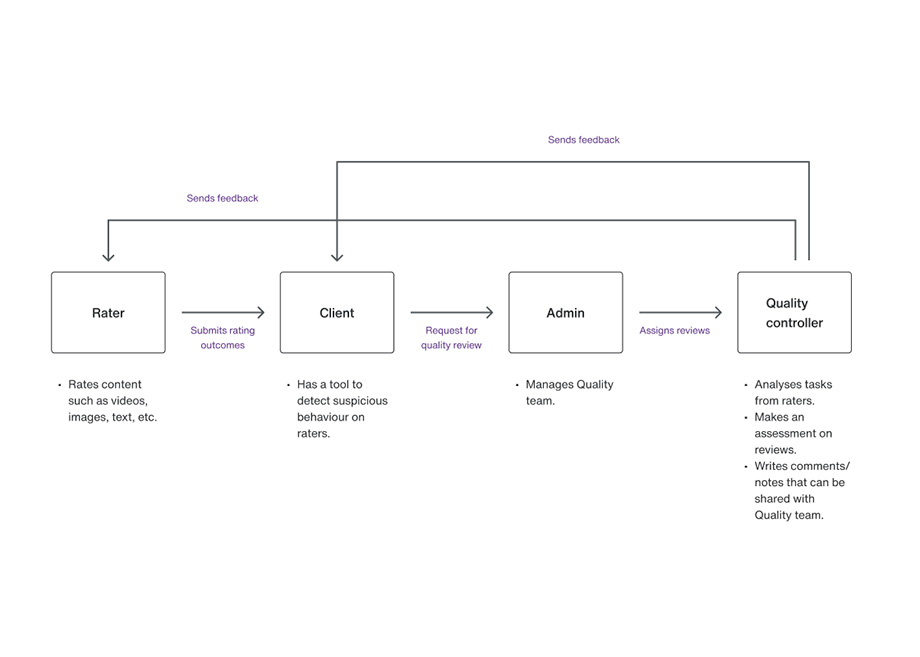
To better understand the product ecosystem, I first analyzed how rating reviews were triggered and processed.
Review process overview
- Raters complete evaluation tasks
- Automated systems detect unusual behavior or inconsistencies
- Quality review requests are generated
- Quality controllers assess flagged tasks holistically
- Feedback and decisions are documented in the platform
This process helped identify where inefficiencies and usability issues were impacting reviewers the most.
RESEARCH AND DISCOVERY
I conducted remote interviews with quality controllers to understand:
- Their daily workflows
- Common frustrations
- Task priorities
- Navigation behavior
- Decision-making process during reviews
I documented and categorized findings to identify recurring usability patterns and operational pain points.
KEY FINDINGS:
- Users struggled to navigate large amounts of information efficiently
- Critical actions were difficult to access quickly
- The interface lacked clear prioritization and hierarchy
- Existing workflows created unnecessary cognitive load
- Users needed faster access to comments, notes, and assessment areas
These insights directly informed the redesign strategy.
PROTOTYPING THE NEW EXPERIENCE
Once the flows were validated, I designed interactive prototypes with a strong focus on usability, clarity, and workflow efficiency.
Design improvements included:
- Dedicated assessment areas
- Integrated comments and notes sections
- Improved content organization
- Clearer visual hierarchy
- More accessible actions and controls
Due to the high density of information and actions required during reviews, I introduced a secondary right-side panel that centralized contextual actions and supporting information without interrupting the main workflow.
This solution improved accessibility to key tools while reducing interface clutter.
TESTING AND VALIDATION
The prototypes were tested with users to validate:
- Navigation clarity
- Workflow efficiency
- Accessibility of actions
- Ease of completing review tasks
Feedback sessions helped identify final usability refinements before stakeholder approval.
The testing phase confirmed that the redesigned experience:
- Reduced friction during review workflows
- Improved task accessibility
- Simplified navigation
- Created a more intuitive user experience overall
OUTCOME
The redesigned experience improved workflow clarity, reduced friction, and enabled quality controllers to complete assessments more efficiently.
IMPACT
Quality controllers completed assessment tasks 30% faster after the redesign
Average task completion increased from approximately 30 review tasks per day to 40–42 tasks per day per quality controller
Reduced execution time across the review process
Improved navigation and access to critical actions
Better organization of complex information and review data
Positive feedback from users and stakeholders
Approved for implementation and rollout
By simplifying workflows, improving information hierarchy, and making key actions easier to access, the new design significantly increased operational efficiency. Quality controllers were able to process substantially more review tasks each day while spending less time navigating the tool, allowing them to focus on higher-value quality assurance activities and other operational responsibilities.
LEARNINGS AND REFLECTIONS
This project deepened my understanding of:
- Workflow-heavy enterprise tools
- Quality assessment operations
- Designing for complex data environments
- Balancing usability with operational requirements
- Cross-functional collaboration during product iteration
One of the key takeaways from this experience was recognizing the importance of scalable design systems and consistent UI patterns in improving development efficiency and maintaining product consistency over time.
The project also reinforced the value of continuous collaboration with developers and stakeholders throughout the design process to ensure solutions remain both user-centered and technically feasible.